Phone Tracker
- 3.7
- Rating
- 1.00M
- Installs
- Free
- Price

 Analysis by App-foxy
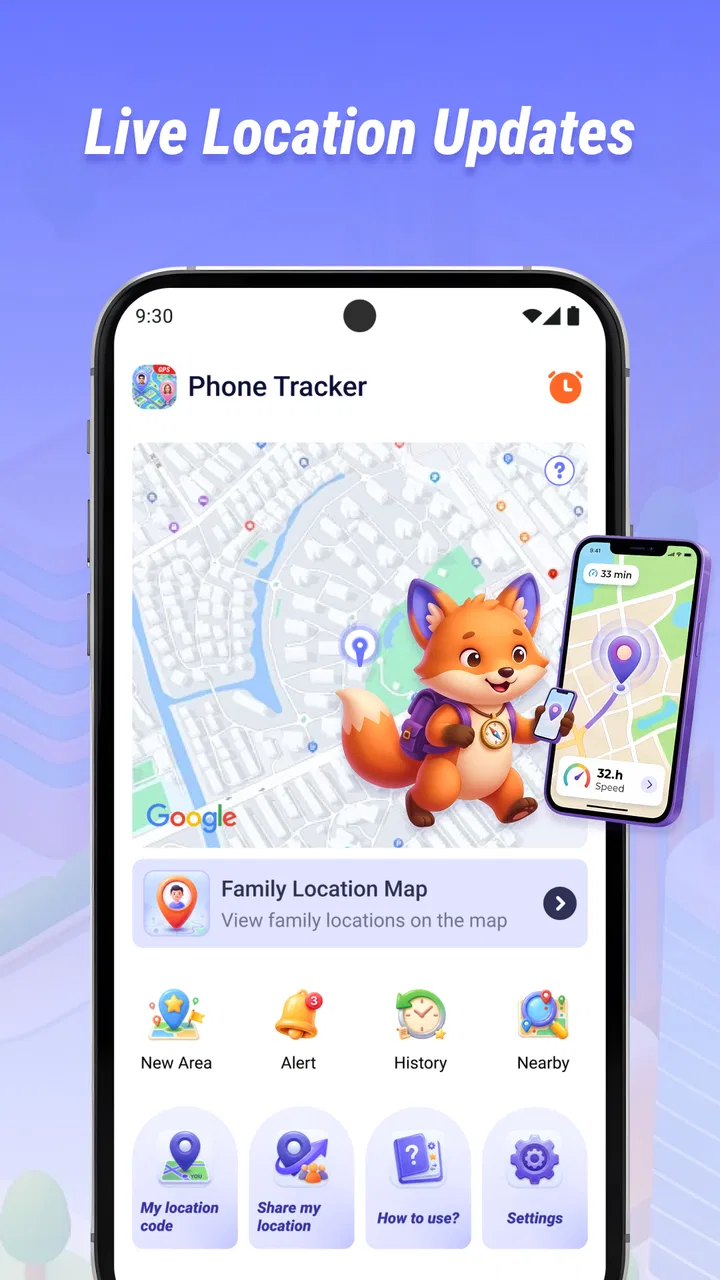
Phone Tracker is the kind of Maps & Navigation app I would consider when I need a simple way to share a current location, rather than a large navigation suite filled with extra tools. Its purpose is straightforward: it focuses on real-time location sharing, with the store short description presenting it simply as a phone tracker. In my experience, that narrow purpose can be useful, but it also means the value depends heavily on a clean setup and on the people involved understanding what the app is meant to do.
The app is free, aimed at Everyone, and comes from CV.Nanda Pratama Mandiri. It has passed the ten-thousand-install mark, which suggests that it has found an audience without being one of the huge, universal mapping services. The release is dated April 13, 2026, and the current version is 1.1.0.0. Those details matter because a location-sharing tool is only practical when the person receiving the location can also use the same current experience, not an outdated installation that behaves differently.
I approached it as a practical tool for everyday coordination: meeting someone in an unfamiliar area, checking where a family member is during a journey, or making it easier to find a phone user who has agreed to share their position. I would not treat it as a replacement for turn-by-turn navigation, a complete travel planner, or a substitute for contacting someone directly when the situation is urgent.
You May Also Like

 Pandora - Music & Podcasts
Pandora’s Music Is Easy to Start, but Harder to Recover
Pandora’s strength is its low-effort path from a seed to a station. Its weak spot is how much confidence it asks you to place in connection, setup, and quiet recovery.

 8 Ball Pool
 Is Built on Rivalries, Rematches, and Routine
A close look at the rivalries, rematches, shared routines, and unanswered safety questions that turn a quick pool match into a persistent mobile community.

 Samsung Music
’s Quiet Strength Is Playing What You Already Own
Its reach comes less from spectacle than from dependable access to a personal library. That simplicity is both the app’s strongest retention engine and its ceiling.

 AccuWeather: Weather Radar
AccuWeather Review: A Quick, Clear Forecast for Everyday Decisions
For everyday plans, the best forecast is the one you can understand quickly. AccuWeather makes rain timing, radar, and local conditions easy to act on, with a few trade-offs.

 Hill Climb Racing
Why Hill Climb Racing Still Turns Crashes Into One More Run
A tiny car, a bumpy hill and one more upgrade: Hill Climb Racing keeps resurfacing because its simple chaos makes every near-miss feel personal.

 AliExpress - Shopping App
AliExpress Makes Global Shopping Feel Personal, but Shoppers Bear the Risk
AliExpress turns a global marketplace into a pocket-sized discovery engine. Its reach is useful, its shopping loop compelling, and its trade-offs easy to miss.
More From Our News Desk
View All News


Where the experience usually gets stuck
The most common difficulty with an app like this is not the map itself. It is the chain of small conditions that must all be correct before a location can appear usefully: the right person must be sharing, the phone must be able to determine its position, and the recipient must know where to look. When one link fails, the result can feel like the app is broken even when the real problem is setup or communication.
I would begin by separating two questions. First, is the phone producing a current location? Second, is that location being shared with the intended person? A map that shows an old position is a different problem from a map that shows nothing at all. Treating both as “tracking failure” usually leads to random tapping and repeated retries instead of a useful fix.
There is also a human issue that many short store descriptions do not explain. Real-time sharing works best when everyone agrees on who is sharing, for what purpose, and when the arrangement ends. If one person assumes the app is continuously visible while the other expects a temporary check-in, confusion is almost guaranteed. I recommend agreeing on a simple phrase such as “I am sharing now” and another such as “you can stop checking” before relying on the location.
The important practical insight is that location sharing is a coordination workflow, not just a map screen. The app can help people see a position, but it cannot decide whether the correct person is involved or whether the information is still relevant. That is why I would use it alongside ordinary messages or a phone call when timing matters.
Why a location can look wrong
Position data is not always equally precise. Indoors, among tall buildings, or during movement, a phone may take longer to settle on a useful position. A displayed point can also lag behind the person if the device has temporarily lost the conditions needed to update it. I would avoid interpreting a stationary marker as proof that someone has stopped unless the person confirms it separately.
This is especially important for family use. If a relative is driving, walking through a crowded area, or moving between places with weak reception, a delayed position may be more likely than a perfectly live view. The safest habit is to use the map as a helpful indication and use direct communication for decisions that cannot wait.
Setup checks that save time
My first setup check would be compatibility. Phone Tracker requires Android 7.0 or later, so I would confirm the phone meets that requirement before spending time troubleshooting an installation or opening issue. The app is also available as a free download, which removes a purchase decision, but free does not mean the setup can be skipped. Location tools still depend on the phone being configured to provide a usable position.
Next, I would install the current version, shown as 1.1.0.0, on the devices that need to participate. Keeping the same current release across the group is a sensible way to reduce avoidable differences. I would then open the app on each relevant phone and follow its on-screen requests carefully rather than dismissing them quickly. If the app asks for access needed to locate or share a position, refusing that access will naturally prevent the main task from working.
I would also check the phone’s general location setting before blaming Phone Tracker. If location is disabled at the device level, an app cannot obtain a useful position. The same applies if the phone is in a mode that restricts background activity or limits connectivity. I would not change every battery and privacy setting blindly; instead, I would make one adjustment at a time and test immediately so I know which change helped.
A good first test is simple and controlled. Put the two phones in the same place, make sure both people know which device is sharing, and check whether the expected position appears. Testing from the same room removes travel, distance, and weak-signal variables. Once that works, repeat the test with one phone a short distance away. This staged approach tells me whether the issue is basic permission, communication between users, or the conditions of the real journey.
A better first-use routine
I would create a small routine instead of opening the app only when something has already gone wrong. Before leaving, the person sharing should confirm that their phone has enough battery, that location is enabled, and that the intended recipient knows the session has started. The recipient should confirm that they are looking at the correct person or session rather than assuming any visible marker belongs to the right device.
For an older family member, I would do the first setup together in person. The useful lesson is not merely where to tap; it is how to recognize a current location, how to communicate that sharing has begun, and how to stop relying on the map when a direct call is more appropriate. For a child or teenager, I would make the agreement equally clear and treat the tool as a safety aid, not as a reason to avoid ordinary conversation about plans.
Another non-obvious tip is to test the entire workflow before a high-pressure event. If the app is intended for an airport pickup, a long trip, or a meeting in a busy public place, I would not make the first attempt on that day. A short practice run reveals whether the recipient understands the interface and whether the sharing phone behaves as expected while moving.
Recovering a workflow that stops updating
When a location stops changing, I would resist immediately uninstalling the app. First I would check whether the sharing phone still has a connection and whether its device-level location setting remains active. Then I would bring the app to the foreground and see whether the position refreshes. This does not prove the underlying cause, but it is a safe, general recovery step that can distinguish a temporary pause from a deeper setup problem.
If the position is still stale, I would have the sharing person stop and restart the sharing action using the app’s available controls, then tell the recipient that a new attempt has begun. The communication matters because the recipient may otherwise continue watching an old screen and assume nothing has changed. I would also close and reopen the app on both phones if the interface appears unresponsive, while avoiding repeated rapid retries that make it harder to know what actually worked.
For a moving user, I would check the result only after the phone has had a moment to obtain a position. A quick glance immediately after leaving a building may show an earlier point. Waiting briefly in an open area and checking again is more informative than refreshing continuously while underground, inside a large structure, or surrounded by dense buildings.
Battery management deserves attention too. A phone with very little power may enter restrictive behavior, and a user may activate an energy-saving mode without realizing that it affects location-related activity. I would test with normal battery settings first, then make only the minimum adjustment needed for the journey. The goal is not to disable every protective feature permanently; it is to avoid an overly aggressive restriction during the period when sharing is genuinely needed.
What to do when the recipient sees nothing
I would verify the recipient’s side separately. Is the recipient using the right account or sharing destination? Are they looking at a current session rather than an earlier attempt? Has the sharing person actually confirmed that the process started? These questions sound basic, but they solve a surprising amount of confusion in location-sharing workflows.
If both phones are together, I would perform a fresh test with the recipient watching from the beginning. This is more useful than sending the same location repeatedly because it shows exactly where the process diverges. If the sharing phone can identify its own position but the recipient cannot see it, the problem is likely in the sharing connection or recipient workflow. If the sharing phone cannot identify its own position, I would focus on device settings, signal, and surroundings first.
I would keep a direct communication channel open during troubleshooting. A message such as “the map is delayed; I am at the entrance” is safer and more useful than silently assuming the marker is accurate. Phone Tracker can reduce uncertainty, but it should not become the only way two people coordinate when the app is being tested or the signal is unreliable.
When the app is not the cause
Some failures come from the environment rather than the application. A phone inside a basement, elevator, underground station, or thick-walled building may struggle to establish a dependable position. Dense urban streets can also make the displayed point less exact. In these situations, I would move to an open area if possible and allow the device time to settle before deciding that the app has failed.
Connectivity is another outside factor. A location may be available on the phone but unable to reach the other person promptly if the network is weak or interrupted. This is why a delayed marker should not automatically be read as a person being in danger or refusing to share. I would call or message the person, ask for a verbal landmark, and use the map as supporting information.
The phone itself can also be the source of the trouble. A nearly full storage area, an unstable system, a damaged location sensor, or a general connectivity problem can affect more than one app. A useful comparison is to check whether another ordinary map application can identify the same device. If every map struggles, I would investigate the phone or surroundings before focusing on Phone Tracker.
There is a privacy boundary here that I consider important. A phone tracker should be used with the knowledge and agreement of the person sharing their position. I would not install or configure it as a covert monitoring tool, and I would not assume that possession of a phone gives me permission to follow someone. The app’s usefulness is strongest in transparent arrangements such as family travel, agreed meetups, and voluntary check-ins.
How it compares with familiar alternatives
Compared with a full navigation app, Phone Tracker appears more focused. A navigation service is usually the better choice when I need route planning, traffic context, place search, or detailed directions. I would choose a normal map application for finding a shop or planning a drive, then use a location-sharing tool when the main question is where an agreed participant currently is.
Compared with built-in phone-finding services, the purpose is also different. Device-finding tools are generally associated with locating a lost handset or managing a device ecosystem. Phone Tracker makes more sense for an active sharing situation between people. If my concern is a missing phone rather than a person who has agreed to share, I would look first at the platform’s dedicated device-recovery option instead.
Compared with sending a one-time location pin, real-time sharing can be more helpful during a moving journey because the recipient does not need a new message for every change. The trade-off is that it requires more trust, more careful setup, and a clear understanding of when the sharing session should end. For a single meeting point, a one-time pin may be simpler. For a pickup where the person is approaching, live sharing may be more convenient.
The app’s focused design is therefore both its strength and its limitation. I like that the use case is easy to understand, but I would not select it if I wanted a broad collection of mapping, travel, and communication features in one place. People who prefer a mature ecosystem with many connected services may be happier with a larger platform, while people who want a narrow location-sharing tool may appreciate the simpler direction here.
Who should use it and who should skip it
I think Phone Tracker is a reasonable fit for people who regularly coordinate face to face and want a shared view of a current position. A parent meeting a teenager after an event, friends trying to find one another at a crowded venue, or relatives checking progress during a road journey are practical examples. The free price makes it easy to try without adding a subscription decision to the setup.
It may also suit users who do not want to learn a large navigation platform just to share a position. The app’s store category and short description make its focus clear, and that focus can be an advantage when the task is limited. I would still spend a few minutes practicing the sharing and receiving workflow before depending on it away from home.
I would skip it if I need guaranteed emergency communication, detailed navigation, or a complete lost-device recovery system. I would also choose another option if the people involved use incompatible devices or are unwilling to install and operate a shared tool. Location sharing only helps when the participating users understand the process and keep their phones in conditions where location and connectivity can work.
For privacy-sensitive users, the decision should be based on consent and routine, not convenience alone. I would define who can see the position, use it only for the agreed purpose, and stop sharing when the situation is over. If that level of clarity is difficult within the group, a simple phone call or one-time message may be the better choice.
My practical verdict after using the workflow
Phone Tracker is best understood as a focused helper for agreed, real-time location sharing. I like the direct purpose, the free access, and the possibility of using it for everyday coordination without turning every situation into a full navigation project. The developer, CV.Nanda Pratama Mandiri, has positioned it in the Maps & Navigation space, but I would judge it primarily as a sharing utility rather than as a general-purpose map.
My main reservation is not about the idea; it is about the conditions every location-sharing app depends on. Permissions, device settings, signal, battery behavior, and user communication all matter. When a marker is late or missing, a calm sequence of checks is more effective than repeatedly refreshing the screen. I would test it at home, agree on the sharing routine, and keep a direct contact method available.
The current version is 1.1.0.0 and the minimum Android requirement is 7.0, so I would make compatibility part of the decision before asking a group to adopt it. The Everyone content rating also makes it approachable for a broad audience, but an accessible rating does not remove the need for responsible consent when sharing someone’s whereabouts.
Overall, I would recommend it to a friend who wants a straightforward way to coordinate location with willing participants and does not need route planning or a large connected ecosystem. I would describe it honestly as a practical, focused option rather than a complete safety system. Use it as one part of a communication plan, test the workflow before you need it, and treat the displayed position as useful guidance rather than unquestionable proof.
FAQs for Phone Tracker
01How accurate is the location tracking feature in Phone Tracker?
Phone Tracker offers highly accurate location tracking by utilizing GPS technology in real-time. However, accuracy can be affected by factors such as signal strength, obstructions like buildings or trees, and the user's device settings. Typically, the app can pinpoint a location within a few meters, making it reliable for most users.
02Is Phone Tracker compatible with both Android and iOS devices?
Yes, Phone Tracker is designed to be compatible with both Android and iOS devices. The app is available for download on the Google Play Store and Apple App Store, ensuring a seamless experience across different platforms. Users should ensure their device's operating system meets the app's minimum requirements for optimal performance.
03Does Phone Tracker consume a lot of battery power?
Phone Tracker is optimized to minimize battery consumption, though any app that uses GPS continuously will have some impact. Users can manage settings to reduce battery usage, such as adjusting update intervals or disabling background location tracking when not needed. It's recommended to monitor battery usage and adjust settings accordingly.
04How secure is my data when using Phone Tracker?
Phone Tracker prioritizes user privacy and data security. The app employs encryption to protect location data and personal information. Users have control over who can access their location, with options to share or restrict data as needed. Regular updates ensure that security protocols are up-to-date, safeguarding user data against unauthorized access.
05Can I track multiple devices with Phone Tracker?
Yes, Phone Tracker allows users to track multiple devices. This feature is particularly useful for families or groups needing to stay connected. Users can add and manage different devices through a single account, making it easy to monitor locations and ensure everyone's safety. Each device must have the app installed and permissions enabled.
Pros
- Accurate real-time location tracking
- User-friendly interface
- Customizable alerts for movements
- Battery-efficient tracking
- Cross-platform compatibility
Cons
- Limited features in free version
- Requires constant internet connection
- Privacy concerns with data sharing
- Frequent in-app advertisements
- Complex setup for non-tech users

Phone Tracker
Gallery